Subscribe via Email
Showing posts with label News. Show all posts

How to Use DOSBox to Play Classic Games


If you want to make your classic games run on a modern PC, you'll have to become familiar with DOSBox, a fully configurable DOS PC emulator that is absolutely necessary for getting most pre-Windows XP games up and running.
The first step is to download a copy of DOSBox that will run on your machine. Head over to the DOSBox download page and pick up a copy for your operating system of choice. For the purposes of this guide, we’ll assume that you’re running Windows and must download the Windows-compatible DOSBox version 0.74.

Install DOSBox anywhere you please, and then set up a specific folder for all your old DOS games with a short name that’s easy to remember, like C:\DOSGAMES. Create a separate folder in the DOSGAMES directory for each game you want to play, but be sure to keep all filenames as short as possible. In the days of DOS, all files had to conform to an 8.3 naming strategy (eight characters before the period, three characters after), so for simplicity’s sake keep all your filenames at eight characters or less if you’ll be running them within DOSBox.
DOSBoxSince DOSBox emulates a self-contained version of DOS on your desktop, you need to fool it into thinking that your DOS game folder (C:\DOSGAMES) is really your root C:\ drive. To do that, you have to mount the DOSGAMES folder as a virtual hard drive. Double-click the DOSBox executable in your Start menu, and when you see a black box with a Z:\ prompt, type the following command: mount c c:\dosgames. That tells DOSBox to treat the C:\DOSGAMES folder as the root C:\ drive. 

To get to your new C:\ drive (or any drive, for that matter), simply type c: at the Z:\ prompt. This action will put you in the C:\ drive (which is actually C:\DOSGAMES), and from there you can navigate to any of your game directories by typing cd followed by the folder name. CD stands for “change directory,” and you can use it to navigate to any directory on your hard drive. For example, if you have a copy of Duke Nukem 3D on your hard drive in the folder C:\DOSGAMES\DUKE3D, you can play the game by typing cd duke3d to move to the folder and then typing the name of the executable (in this case, duke3d) to run the game.
You'll have to remount the proper directory every time you start DOSBox, which can become a pain if you’re just running the same programs over and over again. Here’s a shortcut: Open up the dosbox.conf file in your DOSBox directory, scroll down to the [autoexec] section, and add the following lines of code:
mount c c:\dosgamesDOSBox
c:
That way, DOSBox will default to your game folder every time you start it up.
Enjoy your classic games all over again, and stay tuned for more DOSBox tips and tricks.
Get Free Updates:
*Please click on the confirmation link sent in your Spam folder of Email*

Apple's Earnings Come in Lower Than Expected


Apple announced its earnings for the quarter that ended in September on Tuesday afternoon and though profits rose, they were worse under analysts expectations, leading to shares falling nearly 7 percent in after-hours trading. The company posted quarterly revenues of  $28.3 billion, below the $29.41 billion figure analysts had assumed but above the company's own conservative estimates. That typical conservatism might be behind the latest over-prediction, writes TechCrunch's MG Siegler.
Well, even though Apple’s own guidance for the quarter was $25 billion in revenue, analysts seem to have wised up to Apple's always-low estimates and were projecting numbers far higher
The iPad and Mac computers continued to sell well, but reports show that iPhone sales were slower before the release of the iPhone 4S. With that in mind, CEO Tim Cook released a predictably upbeat press release. "Customer response to iPhone 4S has been fantastic, we have strong momentum going into the holiday season, and we remain really enthusiastic about our product pipeline."
Get Free Updates:
*Please click on the confirmation link sent in your Spam folder of Email*

Phone 4S Reactions: Nothing New, But Still a Great Phone


iPhone 4S Reactions: Nothing New, But Still a Great Phone

After Apple failed to release an iPhone 5 today, there was a collective bloggerboo and the company's stock tumbled more than 5 percent after Tim Cook's first presentation as CEO. Instead we got an iPhone 4S, which will look exactly the same as the iPhone 4, but with some updated specs. For a full list of the updates, peep our rundown.
While it's nothing revolutionary, the phone still has some nice updates. And hey, it's still the best phone around, argues Splat F's Dan Frommer. 
For users, this is still the best phone that money can buy — even better today, with some new features. And for investors, Apple will sell record numbers of these devices, probably earning record profits.
Actually, it may look the same as iPhone 4, but it's whats inside that counts, explains TechCrunch's Erick Shonfeld. 
On the inside, it’s a whole different story, and that the message Apple tried to get across during its presentation today.
First, and most importantly, the iPhone 4S will be powered by a new A5 processor. The A5 is a dual-core processor which will be up to twice as fast as the current A4, and seven times faster processing graphics. Apple is also claiming faster data speeds (with maximums of 14.4 Mbps download speeds, and 5.8 Mbps upload).
While the rest of the phone doesn't impress him, GDGT's Ryan Block appreciates the Worldphone feature.
I will say, I’m pretty impressed they’ve nailed the worldphone aspect here in the same size device. That’s a really challenging thing to do from an antenna design standpoint, and few have ever done this kind of thing before. 
Wired's Tim Carmody agrees. 
Well THAT's something! "You know that the iPhone comes in two flavors, GSM or CDMA. Now the iPhone 4S has both GSM and CDMA."
The update that impressed most was Siri, the Hal-like voice activated control option, it wowed Bits Blog's Sam Grobart. 
This is amazing. And freaky. 
Wirecutter's Brian Lam would even go as far to say that Siri is "life changing."
So far: iPhone 4s. looks same, better cam, wireless, speed, battery. voice controlled assistant = life changing
The phone's updated battery life is a sweet deal for browsing, adds Gizmodo's Mat Honan. 
Apple beefed up battery life. 8 hours of talk time in 3G. That's way longer than I want to talk to anybody...  6 hours of 3G browsing--okay, I might actually do that.
Apple also updated its iOS, Gizmodo's Jesus Diaz and Kyle Wagner don't find anything particularly dazzling, but think its a solid total package. 
All these features put iOS on par again with some of the features that you could already find in Android, Palm or Windows Phone 7. Some of their implementations, surpass those platforms. But even while none of these new features are extraordinary per se, all of them together are quite impressive.
They especially like the notifications update.
The first big feature is notifications. At last, Apple will get rid of the annoying popups that break your flow.
Notifications are clearly and by far the best part of iOS5—particularly coming from the stone age pop-up mess of previous versions. Everyone on staff who's used iOS5 is in love, and the upgrade is the must have feature.
The new iOS's cards feature might sound gimmicky but could make Apple lots of money, points outAllThingsD's Peter Kafka. 
Cards is going to be a huge hit. (srsly)
CUNY's Jeff Jarvis still thinks it sounds really dumb. 
Cards? Are they serious? Mail? Stamps? Post Office? It's dying.

Get Free Updates:
*Please click on the confirmation link sent in your Spam folder of Email*

Google Wallet Won't Replace Your Wallet Anytime Soon


Google Wallet Won't Replace Your Wallet Anytime Soon Google wants to replace your wallet. "Our goal is to make it possible for you to add all of your payment cards to Google Wallet, so you can say goodbye to even the biggest traditional wallets," explains Osama Bedier, Vice President of Payments in a post announcing the official release of Google Wallet yesterday. Google's Android software has already replaced your phone, your discman, your phonebook, and now it's ready to lighten your load. At least that's how two Google developers explain it in the company's accompanying video. But unlike releasing a phone, replacing a credit card with a phone application will take a lot more than a slick application. 
No matter how well the application works--and the reviews for Google Walletare pretty good--Google will face lots of roadblocks before the technology can become mainstream enough to full-on replace your wallet. 
There aren't enough credit card companies on board. Google wallet only supports one credit card: the Citi Mastercard. "I don’t have one of those, and had a hard time finding anyone who does," explainsTechCrunch's Greg Kumparak. As a crutch, Google also provides a prepaid card, which can be loaded up with cash. But it doesn't exactly work like a credit card, and would most likely supplement, not replace your other cards. Google claims it has other partnerships in the works, "though there’s no clear ETA on when they’ll be ready for customer use," reports Wired's Mike Isaac.
Not all retailers have the infrastructure to support it. Google Wallet only works with a compatible card reader. "Therein lays one of Google’s biggest challenges: getting these card readers everywhere," continues Kumparak. "Even out in the relatively low-tech East Bay of California, I had no trouble finding locations to at least test things out." If you can't use it everywhere, you can't totally forgo your wallet. 
It has very bad battery life for a wallet. Your credit cards and cash never run out of battery life. A phone does. "If your phone runs out of juice, consider it the end to your cash flow. Short of finding a nearby extension cord or a back-up $20 in your sock, you won’t be able to pay for much of anything," continues Isaac. Imagine getting stranded sans outlet: No phone, no cash, no nothing. 
People just aren't used to using phones as credit cards. It might be easier or faster or provide cool coupon deals, as we've reported, but people don't like to change habits. "Every time I use Google Wallet, the person on the other side of the register looks at me like I’m Marty McFly and I’ve just stepped out of the DeLorean, hoverboard in hand." 
Get Free Updates:
*Please click on the confirmation link sent in your Spam folder of Email*

Facebook Has 10,000 Times the Photos the Library of Congress Does


Facebook Has 10,000 Times the Photos the Library of Congress DoesThink Facebook is just full of zit-faced teens and stoner college kids, all "friending" and "tagging" and "poking" and doing God-knows-what-else to each other? If so, you're probably over 30 and haven't seen The Social Network yet. In any case, I offer you the following statistic in long line of statistics that demonstrate how important social networking has become. According to Jonathan Good, a blogger at 1000memories, Facebook has more than 10,000 the number of photographs uploaded onto its servers than are in the entire Library of Congress.
Good drops this factoid in a blog post where, using some back-of-the-envelope calculations, he attempts to figure out the number of photos that will be taken in 2011. (His estimate is 3.5 trillion.) He pegs the number of photos on Facebook at 140 billion, extrapolating from what Facebook engineers have said about the site's photo library in the past. The social network, by the way, has become the largest photo-sharing site on the Internet, threatening the existence of places like Flickr. The Library of Congress, by comparison, said in its latest available report that it owned "12,557,200 photographs." So Facebook has slightly more than a factor of 10,000 times the number of pictures. He illustrates that stark, orders-of-magnitude discrepancy below.
Even 11-month-old Instagram, with only four employees, has about 10 times the number of photos. "Yeah. This is worth knowing," writes Charles Apple at the American Copy Editors Society. "Because social media isn’t just a cute little fad. Like it or not, social media is the future of media."
For the record, the Library of Congress is considering the world's largest library by number of books and shelf space. But nobody goes to libraries anymore because of said Internet. There, it's all e-books on shelf space called iPads. The main difference is that every word gets either an "e" or and "i" at the front of it.
Get Free Updates:
*Please click on the confirmation link sent in your Spam folder of Email*

Windows 8 Arrives, But Apple's Not Eclipsed Yet


Windows 8 Arrives, But Apple's Not Eclipsed Yet

The first hands-on glimpse of Windows 8, Microsoft's latest version of its legendary operating system. The reviews are out, and PC Magazine notes, there are a lot of them on Twitter.
Professional reviewers are weighing in, too, beyond the question of whether this marks the death of Flash, to take up what the system feels like to use. The new suite is "radically different," according to ABC News, which gave the new program a glowing write-up.
Some see a major rivalry coming with Apple. Windows 8 is designed to work on desktops, tablets and mobile devices. Will that mean that Windows will now see as frequent tinkering and updates to its mobile product line as users have received from Apple? A good question.
International Business Times administers a splash of cold water. At least for the time being, the publication writes, the market for tablets and operating systems thereon belongs to Cupertino, not Redmond. Apple's dominance with the iPad is so great that rumors of an iPad 3 have been "shut down,"this piece notes. Why rush one to market when the iPad 2 is still flying off the shelves as-is.
Windows 8 may be radically different, but it will have to trigger radical changes in consumer preference to change the current balance of power for the tablet market.
Get Free Updates:
*Please click on the confirmation link sent in your Spam folder of Email*

Facebook's Newest Problem: Being Boring


Facebook's Newest Problem: Being Boring

A new theory about the fate of Facebook is floating around the internet. Mike Elgan says it best: "Don't look now, but Facebook is quickly becoming the new Yahoo." And he doesn't mean that as a compliment. 
The backlash comes hot on the heels of Facebook announcing two new features: the Subscribe button and Smartlists. We pointed out at the time that the Subscribe button negates the need for Twitter--or at least Facebook would hope so. It's not dissimilar to Yahoo launching its own social network, Mash, at the same time that Facebook was becoming recognized as the world's primary social network. Yahoo shuttered the service after only a year. Similarly, Facebook's Smartlists is an obvious repackaging of Google+'s major innovation, Circles. Kind of like that time that Yahoo repacked Yahoo Mail as Ymail in anaked attempt to compete with the new rising star Gmail. All the while, Yahoo survived because of their Herculean traffic numbers and the display ad revenue that came with that.
As Elgan says, Facebook's ability to make money means that it probably won't disappear or fail, but like Yahoo, it will continue to become painfully boring:
Yahoo has no vision. It has no purpose. It's dispensable. Yahoo continues like a zombie, animated by the life it once had.
And that's what Facebook is becoming. Yes, they'll continue to have users. And yes, they'll continue to make money. But Facebook is looking increasingly like a one-trick pony that doesn't have the vision to reinvent itself for the post-Facebook era.
Some people don't think this is such a big problem. Farhad Manjoo at Slate lauds Facebook's new Smartlists and Subscribe button, pointing out that lax patent laws on the web mean that "Facebook is free to grab what it wants with both fists." Manjoo thinks that Facebook does it well, too. "I hope they keep at it," he continues. "If there's a good feature on some other social network, why should I have to leave Facebook to get it?"
The obvious reason is that Facebook doesn't actually copy others' products that well--or to take a more objective route, users simply aren't catching on to the new copycat features. In a trajectory that very much resembles Yahoo Mash, Facebook launched and killed its Groupon and Foursquare copycats within a year. Facebook announced last October that it was going to reinvent email and messaging, but it didn't quite work out that way. "Facebook hasn't talked about it very much since," points out Matt Rosoff at Business Insider. "And we've never seen a message from a facebook.com address in any of our other email inboxes." Rosoff actually made a whole slideshow of examples of Facebook's failed copycat version. (We recommend viewing it as one page.)
Who knows. With Carol Bartz's departure and all kinds of chatter about some Silicon Valley savior swooping in to save the company, Yahoo could make an amazing turn around, and give Facebook's critics food for thought. In the meantime, we're still using Gmail, reading Twitter and checking in on Foursquare. Meanwhile, Facebook is still fantastic for looking up college friends' phone numbers. And Yahoo still has a lot of ads.
Get Free Updates:
*Please click on the confirmation link sent in your Spam folder of Email*

Why Mobile Payments Are More Than a Credit Card on Your Phone


Why Mobile Payments Are More Than a Credit Card on Your Phone

When Google announced Google Wallet, its mobile payment system, back in May, beyond the usual privacy and security concerns, a "so what? who cares?" factor crept into the conversation. Credit cards, debit cards and cash are pretty convenient, pointed out The Atlantic's Alexis Madrigal: "I can't help but wonder, though, if the biggest question remains unanswered: why would people use their phones to pay for things if they have perfectly acceptable alternatives already?" If it's just a credit card on your phone, there's little incentive to change your habits--and that goes for any cell phone-credit card mashup. But, companies experimenting with the tech, like PayPal and MasterCard, who both unveiled their mobile payments platforms, report Endgadget's Josh Volpe and, in another post, Endgadget's Lydia Leavitt, are adding some bells and whistles, making mobile payments more than a credit card on your phone.
It's faster. Swiping plastic takes time. You have to rifle through your purse or pants-pocket, find the card, slide it through the machine, maybe enter your pin or decline giving $5 to colon cancer, and then sign with a germy stylus. Mobile payments have fewer steps, as one of Madrigal's commenter's, Jef, argued, "It's just way quicker than any other methods you've mentioned." Both MasterCard and PayPall are playing that up. Google Wallet will work alongside MasterCard's PayPass stations, which as Gizmodo's Matt Buchanan points out, are pretty ubiquitous. "you'll be able to use it anywhere that's hooked up with PayPass, which is at a lot of retailers already." While PayPal's system won't have that advantage, Leavitt reports the company wants to incorporate "fast checkout," and as this video shows, there are lots of features that ease payment transfer, like phone-bumping.


Yet we're not really sure how much faster the system really is. In the MasterCard demo video over at Endgadget, it looks a bit cumbersome to us, but maybe it just takes some practice.
It will make you more fiscally responsible. Credit cards are far too easy to use. Even if you don't have the funds, you could swipe all day long. Unlike your physical credit card, MasterCard's app has features to help you curb your spending, explains Volpe. "If you're the paranoid type or just a spendthrift, the app offers plenty of options to set spending limits, approve / block purchases via category (i.e. dining, entertainment) and enable alerts for overseas activity." Of course, you have to set up said limits, but, maybe you're the responsible type.
In a different vein, PayPal plans on offering hyper-local deals, a more fun way to save money (save while you spend!). And both systems will also focus on QR codes, which help buyers, "scan for coupons, order remotely and apply the discount -- all without leaving their seats," explains Volpe.
It also is more educational. Credit cards have one function: Paying for things. Mobile payment apps can educate you as you shop, with the wave of your phone. MasterCard has utilized the same technology that your Xbox Kinect uses to make shopping more informative. "Utilizing the gesture recognition tech, items could be selected on-screen by holding your hand over an item and navigating through the checkout process," reports Volpe. That means you could know a lot about a product by just hovering your mobile device over a product. That's pretty cool. 
Neither PayPal nor MasterCard has released its system yet, so getting buyers to change habits will depend on just how seemless mobile payments make these actions. But, if it really is better than a credit card on your phone, your wallet might get slightly lighter. 
Get Free Updates:
*Please click on the confirmation link sent in your Spam folder of Email*

iPads Aren't For Kids, But This Tablet Is


iPads Aren't For Kids, But This Tablet Is Kids like playing with iPads. Last year both ComputerWorld and The New York Times called it the toy of the year. There's something about the big screen, touch interface, and fun apps that make it a child magnet. And it works for parents too: It's like TV with more moral justifications because of its educational and creative apps. But giving a six-year-old a touch screen tablet presents some concerns. Tech does things to kids brains. The Times even has a whole series on the psychological effects of technology on young minds. Not to mention the safety hazards and the possibility of your kid veering from the brain-building apps to something more distracting. What to do? Build a kid-friendly tablet. And that's exactly what LeapFrog has done with the LeapPad tablet, reports The Wall Street Journal's Katherine Boehret. Instead of full-on banning the future, LeapFrog has created something to make both parents and kids happy, without the doubts a fully-plugged in iPad. 
An iPad acts as the perfect child pacifier, but it's like handing over the distracting, not-so-educational, and sometimes raunchy, Internet to your kid, a tablet just for children ensures your innocents are using the tech for relative good. The iPad has lots of learning and development programs that benefit the mind, so we should let kids roam its apps explains The New York Times's David Pogue as he struggles with the idea of letting his youngest play around with his iPad. "In the old days, we used to tut-tut about how much TV kids watched--but parents usually made an exception for educational shows like 'Sesame Street' and 'Between the Lions.' How is this any different? Shouldn’t we make exceptions for creative and problem-solving apps?" But it also has other not-so-great content. The LeapPad doesn't, explains Boehret. "This tablet can be used for reading e-books, playing games and running through digital flashcards." That's it. And its main focus is education. Boehret explains how it works: 
When children set up the Explorer, they enter their grades, ranging from prekindergarten to sixth grade. The device's activities then automatically tune to a child's capabilities. This means that if a third-grader is performing at a higher level than is expected for that age, the Explorer adjusts to a slightly higher level, and the child is notified and congratulated. However, if a child is progressing at a lower level, the system adjusts to a slightly lower level without notifying the child.
It also lets parents follow along with their child's progress, in a more refined way than standing over your kid's shoulder with the LeapFrog Learning Path feature, continues Boehret. "Whenever the Explorer is plugged into a computer, details about the child's time on the device are transferred to the PC so a parent knows how the child is performing and can get tips on how to help the child improve."
The physicality of the LeapPad also makes more sense for kids, than a standard tablet's. Unlike the iPads, more delicate screen and casing, made with "with tough plastics, a sheet of Mylar over its glass screen and an extra metal frame around the screen to withstand physical abuse," explains Boehret. The device also addresses safety concerns of lithium ion batteries, continues Boehret. "LeapFrog's spokeswoman said this keeps the cost low and noted that Li-Ion batteries can leak, making them unsafe for kids' toys." 
Of course all of these compromises come with a price: It's chunky (one-inch thick), has lower screen quality, and is slow. But, what child will care or notice? For $100 you get an educational babysitter that your kids will like. They won't even know what they're missing. 
Get Free Updates:
*Please click on the confirmation link sent in your Spam folder of Email*

How To Subscribe On Our Site


Here Is The Short Video Which Will Show You That How To Subscribe On Our Site
Get Free Updates:
*Please click on the confirmation link sent in your Spam folder of Email*

Japan Gets PlayStation Vita First, Rest of World Still Delayed to 2012


When will the PS Vita launch in the U.S. or Europe or anywhere that isn't Japan? We still have no idea, but according to Sony, Sony's PS3-like portable game system will debut in he Land of the Rising Sun on December 17 with 26 launch titles. The Vita 3G version—Sony's selling one with, one without—will also run on NTT DoCoMo's cellular network.
The "rest of the world" delay, which Sony admitted in August after promising repeatedly that we'd see this thing by the end of 2011, is turning out to be less of a big deal than anyone thought. No one expected Nintendo's 3DS—specifically the 3DS's software—to be so underwhelming. Absent great games, a platform's nothing more than potential energy in search of a kick. Price drop or no, Nintendo's 3DS has yet to receive one, and yesterday's announcements involving awkward add-on peripherals and at least one highly anticipated game (Kid Icarus) bumping to 2012 haven't helped.
Not that Sony's had an easy year. The company spent 2011's earliest months recovering from the Japanese earthquake, then hounding PS3 hacker George Hotz in a public-relations-unfriendly legal kerfuffle over Hotz's PS3 jailbreak. In April, hackers—supposedly in retaliation for Sony's pursuit of Hotz—took aim at the PlayStation Network (and eventually several other Sony properties), triggering one of the longest, farthest-reaching online service failures in modern history.
The Vita represents Sony's latest love-letter to traditional gamers. It's considerably larger than an iPhone or Android mobile, unusually powerful (for a handheld) and therefore power-hungry, and it's as expensive as a fully-loaded PlayStation 3 or Xbox 360. Sure, an iPhone costs up to $600 or $700, but most are paying $200 to $300 for the 16GB or 32GB versions with a new contract. That, and they're getting a lot more than just a bulky handheld gaming system.
"This new device is packed with every possible function, and that's why we confidently call it the ultimate entertainment system," said Sony games unit honcho Hiroshi Kawano at today's press conference.
Except the "ultimate entertainment system" these days can do a lot more than merely entertain. The Vita's not a phone. It's not a messaging device (oh, it'll have stuff like Skype and Twitter...you know, because that's worked so well on the keypad-less PSP). It sports a pair of low-end VGA cameras, so it's not something you'll be popping out to snap pics for photo albums. It won't do 3D (okay, so that's maybe a plus). It won't organize your life. Its app store's restricted to games, because that's all it is: a souped-up PSP with a clever double-touchpad angle—a portable PS3 with a "TOUCHAXIS" in lieu of a SIXAXIS.
"But it's not meant to do any of that stuff!" you're saying. And you're right. And that doesn't really address the issue I'm getting at, which is whether there's still a market for this kind of device. I mean, of course there's a market for it, but is it sustainable and substantial enough to warrant a $250 to $300 system that you'll have to tow alongside your tablet or laptop and smartphone? Nintendo's been able to sidestep that question with the DS up to this point because it's big with kids. Less so the PSP. Does Sony think it'll be any different with the Vita?
You—that's the you screwing up your face and preparing to let me have it down below—may be perfectly happy packing enough kit to make a 1980s Gordon-Gekko-style brick-phone look like a matchbook, but will you be enough to offset the consumer trend toward one-device-fits-all? That, as the iPhone 5 and future Android and Windows phones loom, is the question foremost on Sony's mind at this point, I'm betting.
Get Free Updates:
*Please click on the confirmation link sent in your Spam folder of Email*

Here's Why You'll Ditch Your iPad for Windows 8


Here's Why You'll Ditch Your iPad for Windows 8

Yesterday, before Microsoft revealed its latest operating system to developers at the BUILD conference, we suggested Windows 8 might wow the world, providing a real competitor to Apple's iPad dominance. And we were right. Or at least that's what early critics are saying, giving the new product rave reviews. "'Hello, Windows 8? This is iPad. You win,'" tweeted win Supersite editor Paul Thurrott. And Boy Genius Report's Zach Epstein titled his take "Sorry Apple, Windows 8 ushers in the post-post-PC era."  Microsoft hasn't revealed when consumer products will make it to the masses--and things could change on both the Apple and Microsoft fronts--but the developer's preview has techies giddy. What about this system will make users forgo their Apple monikered tablets for a Windows product?
The start menu redefined. We fell in love with Windows for that little icon in the lower left hand corner that made computing less code-y and more intuitive. Apple presented its answer to Start, with its user-friendly OS and people eventually came. With Windows 8, Microsoft has decided to change things up again. Presenting: Tiles. "When you hit the Start screen, you see apps as tiles laid out in a grid. Goodbye, icons," explains Gizmodo's Mat Honan. You can navigate them with your fingers, a mouse, or the keyboard. They work like icons, but group information in a way that makes sense and is easy to navigate continues Honan. "You scroll sideways across tiles, which you can also organize into groups by themes—and because they are so large it's really easy to navigate around to what you want to do. Within individual apps, you can "pin" actions, creating new tiles."
Beyond tiles, 8 also puts search closer to your finger tips, as Ars Technica's Peter Bright explains.
Keyboard users never have to click the search charm in the Edge UI. They can just start typing, and Windows 8 will search automatically. Though the presentation is very different from Windows 7's, the functionality is the same: hit the Start button, start typing. Windows 8 does it better, in fact, due to the search contracts and in-app search features. If you use search and tiles pinned to the "main" (left-most) Start screen, applications are typically more accessible than they would be in the Start menu--few people pin 20 apps.
Just makes things faster and easier for you.
But really, it's about power. A slicker way to navigate won't be the reason you will want to ditch your Apple product, argues SF Gate's James Temple. "But that's far less interesting, to me at least, than bringing the power of a full-fledged operating system to a tablet." The iPad doesn't work like a full fledged computer. Microsoft's presenting something that's as light and portable as a tablet, but that has the power of a PC. "It has a battery that can last all day, but it can also run Photoshop, Excel and Outlook. It can weigh next to nothing and slip into a slim case, but it can also power two monitors and run proprietary enterprise software," explains Epstein. It has the best of both worlds. It will boot up in 8 seconds, but can also run powerful programs, like Photoshop. It takes the idea of an iPad and expands its capability, exponentially. 
It also has some other nice touches. It encorporates the swiping and pinching motions you learned with Apple. It also provides a nice multitasking feature, as LifeHacker's Whitson Gordon points out. "None of this is brand new to touch-based platforms, but what is new is the ability to not only multitask, but run these apps side by side. Say you want to watch a video and keep an eye on your news feed at the same time."
Then again, it's not too new to scare you away. While the new start features, tiles, and swiping depart from conventional Microsoft thinking, beneath the surface its still the same old Windows. The Start menu may bundle and present applications in a new way, but its the same idea, argues Bright. "Windows 8 provides a very different look and feel, but it doesn't force you to work in a fundamentally different way. And desktop icons, toolbars, and taskbars haven't gone anywhere. 
Of course a lot can change--this is just the developers preview. Apple still has time to catch up and create their version of Windows 8. But Microsoft most definitely got there first. 
Get Free Updates:
*Please click on the confirmation link sent in your Spam folder of Email*

HP Introduces New Enterprise Security Software


Hewett-Packard is expanding its Enterprise Security Solutions portfolio to help businesses deal with persistent security threats from cloud computing and social media.
The new security portfolio is aimed at helping businesses deal with threats arising from mobile computing, the consumerization of IT, the adoption of cloud services and social media. Enterprises need to manage risk with a balanced approach to systematically assess these security threats, according to HP.
To achieve this, HP is combining its security products and acquisitions into suites "designed to help enterprises establish and execute a comprehensive security strategy that addresses threats and potential liabilities resulting from the rise of mobility, cloud computing and social media," the company said in a press release Monday.
ArcSight, Fortify Software and TippingPoint have been combined in a risk management platform. With that platform in place, HP hopes to eliminate the fragmented security practices in the enterprise.
The company also unveiled several security tools. ArcSight Express 3.0 is aimed at detecting and preventing cyberthreats. HP Reputation Security Monitor lists malicious IP (Internet Protocol) and DNS (Domain Name System) addresses. Fortify Software Security Center suite tests for vulnerabilities. TippingPoint Web Application Digital Vaccine is used for sniffing out malicious traffic and for real-time identification of vulnerabilities in Web applications.
According to Tom Reilly, vice president and general manager of HP enterprise security products, businesses are building infrastructures that are "a patchwork of unrelated security products and processes." In a video explaining the new security tools, Reilly said that "the result is a proliferation of point solutions with no coordination across silos, business units or functionaries."
By combining its security tools HP hopes to eliminate this fragmentation. To do this HP also introduced new Information Security Management services, Enterprise Cloud Service threat management software and Application Security Testing-as-a-Service to identify and close vulnerabilities in the application layer.
Get Free Updates:
*Please click on the confirmation link sent in your Spam folder of Email*

How to Play Classic PC Games in Windows 7


Classic PC games only get better with age--but if you don't apply the right tricks and tweaks, they won't run on your Windows 7 computer. Not to worry: We've assembled a series of quick how-to guides to help you make your favorite games work on your modern PC, in all their 640-by-480 pixelated glory.
Every now and then we get tired of blowing up baddies in Battlefield or running raids in World of Warcraft. Sometimes we just want to settle down for a spell and play through Daggerfall for the umpteenth time, or take the Marathon series for a spin and see what all the hubbub was about. We yearn for a simpler time--a time when MIDI soundtracks rang in our ears as if our Sound Blaster had an orchestra in it, and we could still count the pixels on the screen.
So we dig out our old CD wallets and burrow through boxes of old floppy disks, only to discover that even though we still have the game, it won't install or play on our modern Windows 7 PCs. Even XP is too new for most of our favorite classics. Instead of playing games, we end up spending hours scouring the Internet for patches and install guides to get our old games working on our new PCs.
Planescape: TormentPlanescape: TormentAnd now we're going to save you the trouble. We're starting with five how-to guides that will help you get Daggerfall, Duke Nukem 3D, Grim Fandango, three RPGs based on BioWare's Infinity Engine (Baldur's Gate, Planescape: Torment, and Icewind Dale), and the Marathon trilogy working on your PC perfectly. What's more, some of these games have been updated to look better than new, with fan-made patches that make the game work with 16:9 monitors at high resolutions, update the in-game graphics and rendering engines, and more. And every time we figure out how to get another classic game working, we'll add it to the list on the right side of the page.
Be warned: Some of these guides can be pretty tricky to follow. You'll need to be well acquainted with your PC to get many of these old games to work. And in some cases you'll need to dust off your DOS skills and get to know the DOSBox emulator (we've included a DOSBox primer, as well). No one said it would be easy.
Get Free Updates:
*Please click on the confirmation link sent in your Spam folder of Email*

AT&T Leads the Way for Windows Phone 7.5 "Mango"


AT&T has unveiled a lineup of new Windows Phone 7.5 "Mango" smartphones coming soon, and plans to upgrade existing Windows Phone 7 devices to Mango soon. With the additional devices, AT&T will have seven different Windows Phone 7 smartphones to choose from
AT&T currently offers four different Windows Phone 7 models: HTC HD7S, HTC Surround, Samsung Focus, and LG Quantum. Now, AT&T is expanding that lineup with three new Windows Phone 7.5 "Mango" smartphones--the HTC Titan, Samsung Focus S, and Samsung Focus Flash.
AT&T logoAT&T announced that the "Mango" update is coming soon to existing WP7 smartphones.The HTC Titan has a massive 4.7-inch display. A couple tenths of an inch bigger and it could be a Dell tablet. It has a 1.5GHz processor, and an 8-megapixel camera with dual LED flash. As impressive as it in some ways, though, the lack of a front-facing camera could turn some users off.
The Samsung Focus S is the next generation of the leading Windows Phone 7 device, the Samsung Focus. The Focus S has a 4.3-inch Super AMOLED display, 1.4GHz processor, an 8-megapixel rear camera and a 1.3-megapixel front-facing camera, and it does 4G.
The Samsung Flash will be the smaller, more economical cousin of the Focus S. It has a 3.7-inch Super AMOLED display, and a similar 1.4GHz processor, but the rear-facing camera is only 5-megapixels. It does have a front-facing camera as well, but there are no details available for it.
Windows Phone 7 smartphonesAT&T is expanding its lineup to seven different Windows Phone 7 smartphone options."Our customers love Windows Phones which is why we've sold more of them than anyone else," said Jeff Bradley, senior vice president, Devices, AT&T Mobility and Consumer Markets. "We're taking our leadership to a whole new level by getting the Mango update to all existing customers and rolling out awesome new Windows Phones."
In addition to announcing new Windows Phone 7.5 smartphones on the horizon, AT&T also revealed that all of its existing Windows Phone 7 devices will be upgraded to Mango sometime this fall. Granted, fall doesn't officially begin until September 23, and doesn't end until December 22--so it may still be awhile. But, it is better than nothing and the knowledge that Mango is coming soon means that users can feel confident buying existing Windows Phone 7 smartphones.
AT&T has embraced Windows Phone 7 much more than its wireless rivals. According to Microsoft, Sprint has only the HTC Arrive, and Verizon just offers the HTC Trophy. T-Mobile has two with the HTC HD7 and the Dell Venue. Other wireless carriers will probably be announcing new Windows Phone 7.5 "Mango" devices soon as well, though.
Get Free Updates:
*Please click on the confirmation link sent in your Spam folder of Email*

Boot Linux From a Portable USB Drive With Universal USB Installer


"Live" distributions of Linux offer a wonderful convenience for those not quite ready to commit to the open-source operating system. By booting Linux directly from a CD (which you burn from a downloaded .iso file), you can try it out without first installing it onto your hard drive. But live Linux CDs have their problems. Optical media is slow. It's also read-only, limiting your ability to configure the operating system. Finally, many of today's netbooks and ultraportable laptops don't have an optical drive. TheUniversal USB Installer (free) offers a simple and elegant solution to those problems.
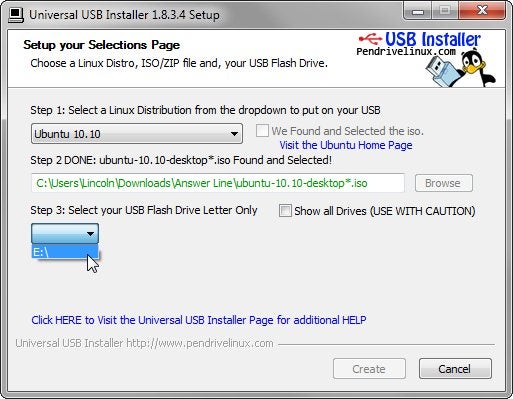
Universal USB Installer screenshotThe Universal USB Installer offers a broad selection of Linux versions to install on flash drives.Universal USB Installer can use a live Linux .iso file to create a bootable flash drive. Flash is much faster than optical media, can be easily written to, and is available on all current PCs. It's also easier to stick into your pocket.
The program supports a huge number of Linux variations, including the popular Ubuntu, Debian, and Puppy--a favorite of mine for Windows data recovery purposes. Universal USB Installer also supports some programs that we don't think of as Linux, although they are if you look closely, such as EASEUS Disk Copy and DBAN.
When you select your Linux flavor, the Universal USB Installer will look for the needed .iso file in the current folder. If it doesn't find it, it will offer to download the file for you or let you tell it where on your PC to find it.
There is one slight danger: You have to select which drive Universal USB Installer writes to, and by default, it only shows you external drives that were already plugged in when you launched the program. You can see all of your drives--internal and just-plugged-in externals, if you check the Show all Drives option. If you do that, it's possible to select the wrong drive and render Windows unbootable. You'll get plenty of warnings, however.
Universal USB Installer provides a remarkably easy way to run Linux onto your PC.
Get Free Updates:
*Please click on the confirmation link sent in your Spam folder of Email*

Six Big Windows 8 Features for Small Business


Six Big Windows 8 Features for Small BusinessWith Microsoft's big BUILD conference right around the corner on September 12, people are buzzing about the Windows 8 news that's sure to come, and for the last couple of weeks, Microsoft has been parceling out information. So far, the features we’ve seen look colorful, fast, flashy, and flexible—but how much of a difference will they make for small business users?

Let's take a look at the Windows 8 features that have already been revealed and see what kind of an impact they could make--for better or for worse.

1. That Metro Experience

The first thing you’re likely to notice in a Windows 8 demo isthe new Metro style and the fluid movement on the screen. Designed to be similar to the beautiful Windows Phone 7 interface, Windows 8 uses live tiles to surface need-to-know information right from the start. Live tiles are small, tap-able color blocks that display specific information--such as how many email messages are waiting for you or what your next appointment in town is about.
The Start screen in Windows 8The Start screen in Windows 8To launch a program, you can tap the tile that represents it, or flick from the right edit of the screen to display the controls, then tap a button to launch the program you want to use. Once you're finished with that task, flick it away--or move it up to the corner of the screen out of the way--and tap a different program tile to open it. This means you can open and close and rearrange pieces of information on your desktop in much the same way you would on your physical desk.
A Windows 7 feature called Snap enables a side-by-side workspace experience. For example, you can add new customers to your contact list while watching a demo of a new sales training video, all using the same simple gestures as on your touchscreen smartphone.

2. It’s Keyboard and Mouse-Friendly, Too

If you’re a holdout with a mobile phone without touch capability, or you're using a notebook that doesn’t support touch, you may worry that Windows 8 won’t work for you. The design of Windows 8 is driven by an OS that's supposed to run seamlessly on touchscreens and smart devices--with a fluid design for ultraportables, easy adaptability to mobile technologies, and an always-on, always-connected approach.
There will be old and new keyboard shortcuts.There will be old and new keyboard shortcuts.however, your keyboard and mouse should still work the way they always have. Familiar keys like PageDown and PageUp will work; the Windows key still brings up the start menu; and you'll be able to navigate through programs and apps using the same point-and-click method as in Windows 7.
The flexibility of Windows 8 should enable you to switch easily back and forth between the Metro and the desktop views, so the way you interact with your PC will depend on what you want to do and what feels most natural. You might, for example, use Metro while you browse the Web, watch media, preview a presentation, or check email--but switch to Desktop view when you want more precise control of files, folders, or data.

3. Faster Boot, Faster Sleep

Another potential perk in Windows 8 is that it's meant to enable your computer to launch into life almost as soon as you push the power button. Microsoft Vice President Mike Angiulo said in a demonstration in June that startup times of 6 or 7 seconds should be possible.
Additionally, when you wake your sleeping computer, it should return from sleep instantly--which would be a relief after the horrors of Windows Vista and the improved but still lagging wake-up rate of Windows 7. When you’re on a client visit, for example, your computer can be a more natural part of the process. You should have fewer delays when you want to show off a new design, share a proposal, or demonstrate a Web app once you open your notebook.

4. Smooth Data and App Sharing--in the Cloud and Out

While Windows 8 developments are unfolding, Microsoft has been taking big steps in the online realm by launching Office 365, a new cloud computing service for small and large businesses. It's also promoting Office Web Apps, SkyDrive, and Azure as ways to collaborate in the cloud and reduce your IT overhead and hardware investments.
Working in the cloud means you and your team can work together virtually using the online version of tools that keep teams running smoothly in the face-to-face world: real-time communication, team meetings, task assignments, project management, file libraries, and workflow and reporting options.
Office 365We don’t yet know any specifics about Windows 8 features that engage the cloud directly, but the OS will support app-to-app sharing (think of how your Twitter posts show up in your other social media accounts), so the convergence is likely on the way.
Windows 8 will also natively support USB 3.0, which should allow you to access and transfer files up to 10 times faster than USB 2.0. And that hopefully means a little less time standing in front of the room waiting for your presentation to load.

5: A Windows Explorer Makeover

Over the last week or so, Steven Sinofsky, president of Microsoft's Windows and Windows Live division, has written on the Building Windows 8 blog about some of the changes we can expect to see in Windows Explorer. In Windows 8, you should be able to copy, move, rename, and delete files--especially large groups of large files--faster and with better control. You should see the status of multiple file operations and even pause the ones that are slowing things down.
The new Windows Explorer ribbon is part of Windows 8.The new Windows Explorer ribbon is part of Windows 8.Another hoped step toward improved efficiency comes when Windows 8 finds a naming conflict while you’re moving or copying files. If you try to drag a group of files to a folder that already contains files with those same names, Windows 8 will prompt you--and show a smart Choose Files dialog--to click the files you want to keep.
The big improvement appears to be that you will see a number of the conflicts in a single dialog box, along with the information needed to make the choice. And if you’re still confused about which logo file you want to use, you can click the thumbnail to open the file and find out for sure.
What’s not clear is what will happen when you have, say, 20 file conflicts in the same operation—will the dialog box have tabs? Will you still have to click through multiple choices (similar to Windows 7)? That remains to be seen.
The menu and toolbar in Windows Explorer will be replaced with a ribbon layout, similar in style to the one in Office 2010 and the Office Web Apps. Depending on whether you love or hate the ribbon toolbar, you may like (or not) having the ability to touch your way through the Home, Share, and View tabs. Similar to the ribbon in Office 2010, the Windows Explorer ribbon includes contextual tabs to help you find the tools you need based on the tasks you’re performing. And in case you just can't deal with the ribbon or prefer to stick with the keyboard, developers are adding something in the neighborhood of 200 new keyboard shortcuts.

6. Is There an App for That?

The future of Windows 8The Windows 8 App Store has lots of folks speculating. Is it real? What types of apps will it include? Windows 8 is designed for ultraportable and always-on computing, and to be truly competitive in a mobile and ever-evolving market, a Windows 8 App Store is a must.
Windows 8 will be built on HTML 5, Javascript, and CSS. Microsoft VP Mike Angiulo says developers will be able to develop apps for Windows 8 right out of the box. What’s more, Windows 8's sensor platform and support for roaming and location-based apps are likely to find creative development and a storefront on your computer in the form of the Windows 8 App Store.
Even though we’re still working with early information--and much more will be revealed at BUILD--the Windows 8 features we've seen so far have appeal for small businesses. What’s not to like about faster processing, a sleek touch-driven interface, true multitasking, seamless and quick file management, and easy app sharing? If these features deliver as promised, they will make common computing tasks more fluid and natural, freeing you up to focus on the work instead of the technology.
Get Free Updates:
*Please click on the confirmation link sent in your Spam folder of Email*

Google Adds Ebooks and Movie Rentals to the Android Market


Google's begun rolling out another version of the Android Market, which sports not only a new easy-to-browse interface, but also the ability to rent movies and buy ebooks right on your Android phone.
The new interface is very nice, looking almost Windows Phone-like, with asymmetrical tiles filling up the screen. You can browse through editor's picks, search results, or by category in a much more space-efficient way, putting more apps on a page so you can easily browse through them. Installations now take fewer taps, too, so you can get right to buying, downloading, and playing with new apps.
By far the biggest change in the new Market, though, are movie rentals and ebook sales. Now, you can browse a vast library of movies and books right from the main Market page, and download them to your device. You can stream movies straight from the Market, or "pin" them for offline use. Currently, this feature is only available in the US, though they're looking to bring it to other countries soon.
Hit the link to read more about the new changes, or check out the video above to see it in action. The new Market is rolling out to all phones with Android 2.2 and higher, and will roll out over the course of the next few weeks.
Get Free Updates:
*Please click on the confirmation link sent in your Spam folder of Email*

Parallels brings tighter integration with OS X Lion


Parallels' new Mobile app works with iOS devices and allows users to remotely access and control their Mac computers. (Credit: Parallels)

Parallels has launched a new version of its popular virtualization software for running Windows on Maccomputers.

For Mac users who prefer to run their Mac and Windows programs side-by-side without rebooting, the new Parallels Desktop 7 for Mac promises a more seamless experience by bringing Lion functionality to their Windows software. For instance, you can now add programs from your Windows virtual machine to the LaunchPad and have it sit right beside your native Mac applications. New gestures added in Lion, now work in Windows programs as well, including the ability to switch programs to a full-screen view.

Other improvements from the previous version include a substantial speed boost of up to 60 percent when resuming Windows and the ability to use the iSight Webcam simultaneously in both Mac and Windows environments. For the first time ever, users can also run multiple virtual instances of OS X Lion on top of the existing host operating system, which should be very useful for Mac developers when it comes to testing their apps. 

Parallels also announced a new mobile app which will work with iOS devices such as the iPad and iPhone and allows users to access and control their Mac and Windows applications remotely. This mobile app is available in the App Store at a US$4.99 introductory offer, which will revert to a standard retail price of US$19.99 in the future.

Parallels Desktop 7 for Mac will be available in Singapore on September 7 for S$129. The company offers a student edition for S$69 available at retail stores operated by MacShop and Sapura while existing Parallels Desktop users can also upgrade to the latest version for S$69.

Get Free Updates:
*Please click on the confirmation link sent in your Spam folder of Email*